
System Settings Customization
What are System Settings?
System settings contains the settings which customize how an application works. They are those settings that can enable the user to configure the appearance or actions in an application, operating system or the hardware.
System Settings in OPS-COM
In OPS-COM, system settings are a list of various components that must be configured by the admin. The information set up in these components will tell the program whether to allow or prevent, make visible or hide, the use of certain aspects of the program. They will let the program know important information about your organization and how you want some information to be presented. For example, what settings are required to be filled out by your user, how do you want your dates displayed, do you want to enable a waitlist for permits?
While there are a number of settings components, and some that you may not need, there are a basic set of components that will need to be configured. These components include General System, Global, Permits, Security, Temp Permits, and User Profile.
General System Settings
In this component we setup the identification of the site as well as general location and time zone settings.
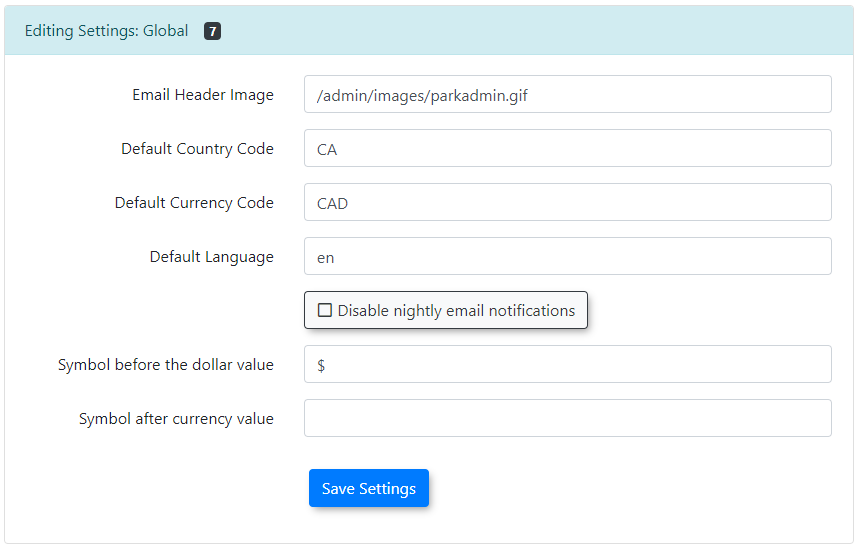
Global Component
In this component we set the deefault settings for:
- Country Code (US, CA etc.)
- Currency Coce (USD, CAD)
- Language (en, fre)
- The symbol used before a monitary amount ($, £, €)
Permits
These settings are used to control the Permits Module. There are several optional settings thnat do not need to be set at this time. The main items that are required on initial setup of your site are as follows.
- Permit Tax Percent
- Settings what information displays on the user portal permit page
- Allowing Credit Card Processing
- Receipt Reply Address
Security
There are various settings that affect how secure your system is. Although some items like password strength are optional, it is highly advised that you configure these setting to improve system itegrity and security.
Temp Permits
On initial setup if you are using temporary parking you simply need to set the tax rate for Temp Permit Sales in this section.

Vehicles Component
There is only one setting of interest in the Vehicles Component.
Toggle on or off the use of VIN numbers should you choose to use it instead of or in addition to a vehicle’s description .
Training
You can follow along with OperationsCommander‘s public training wiki here: https://wiki.ops-com.com/x/zYMCAw.